
What does your mobile phone know about you?
 The Western Weekender has asked me to do a selection of articles on topics of interest to their readers. As I was on holiday a couple of weeks ago, it struck me that if I lost my phone, what would your mobile phone know about you? What information could potentially be available? So what follows is some of the information your mobile knows about you. Mind you, it’s not just your mobile you provide information to – it can be your television, smartwatch or voice assistant like Google Home.
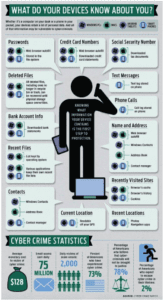
Have you ever wondered what your devices know about you? It could be your Computer, tablet phone, television, smartwatch, or any other device connected to the internet. All this information is now vulnerable to cybercriminals. Below, I will list some of the information.
Passwords
Whenever you enter a password online, your helpful web browser pops up and asks if you want to remember it. This is your web browser’s autofill feature. You can see these passwords by going into the advanced settings in your browser. Other programs also have passwords stored on your device. Some browsers actually copy this information across multiple devices. So if you only use your PC at home to do banking and have saved your password to your browser, it is likely also on your phone as well.
Credit Card Numbers
Web browser autofill also tracks credit card information. In addition, you most likely have downloaded credit card statements on your device. Even if your statements are in PDF format, your device will also search these by default.
Banking Details
Again, browser autofill can be the culprit here. Even if you only use it on your PC – the browser has probably synced this information to all your devices. Like your credit card statements, you also downloaded bank statements. This is all information that can be used for identity fraud.
Your Current Location
Your mobile phone tracks your location via the built-in GPS. If you lose your phone, this is a fantastic feature, but it can also be used to determine where you are or, worse, where you are not. This also applies to smartwatches, car navigation systems, and any other device using GPS.
Your Recent Locations
This is stored as history in Google Maps and time-stamped on your photos. As mentioned in last week’s column, I went on holiday to Canada and Alaska. What did my mobile phone know about my travels, and what information did it supply Google? Have a look at the two pictures below. One shows my total trip, and the other shows a single day. Scary!
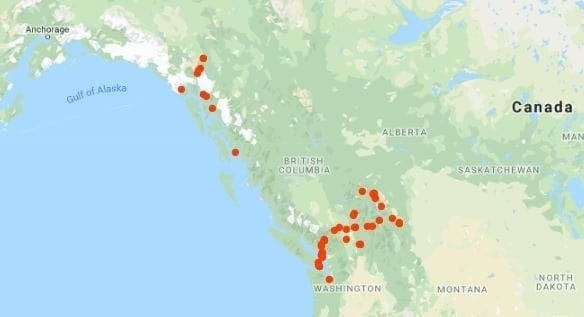
When you upload photos to Google Photos, they will tag your location on the photos and sort them by date and location name. Google Photos can also search for and identify you by facial recognition and show only photos you are in.
Your Contacts
Phones are now used by default for the storage of contact information on all your friends and contacts your contacts and their details. Information is known about your contacts, including name, address, emails, phone numbers and how often you contact them.
Phone Calls / Texts
Phone calls and text message logs. The logs can be recovered even if you delete your call and text history. Nothing is ever deleted. Only when you save new information over deleted information is it gone. Unfortunately, you have no control over this.
Recently Visited Web Sites
Your browser’s cache, history, and cookies store information about your browsing history.
Tax File Number
Tax Details can be stored on your phone either by downloading tax information or by autofill forms. Again, this is good information for identity fraud. As I have already mentioned, even if you delete them, they can still be recovered.
Deleted Files
Files are never really deleted and, unless written over, are recoverable. If you run a file recovery program on your phone or computer, data from years past will still be recovered.
Anything you say
Voice assistants like Google Home and Amazon Echo are always listening. Conversations have been recorded and sent to third parties. They are supposed to only listen and respond to keywords – but these devices always listen. How often have you been watching TV with one of these devices close by and they suddenly come to life?
Smart Televisions
Track what you watch using a technology called ACR (Automatic Content Recognition). Many televisions also identify other devices connected to your network and track when you use them.
Example
How often have you physically visited somewhere only to find their advertisements come up on your social media? Think about what’s involved in this process. Your mobile phone tracks your location via your GPS. They know how long you were in the store and even the specific department you went into. You may have even looked up the comparison price in a search engine. This information is tracked and uploaded and is made available via various advertising platforms.
The store can then target you with relevant marketing based on this information. My wife was quite spooked when an exact pair of shoes from a department store she was looking at appeared in her social media feed. The exact pair of shoes was probably a coincidence, and it was just a popular pair that the store was marketing. Or was it…
In most cases, you are notified of this in the terms and conditions you agree to during the device’s setup. BigBrotherWatch out of the UK has a great factsheet on Terms and Conditions HERE
Scary, isn’t it? Knowing what information you have and what your devices store and keep about you is the first step in your defence in protecting yourself. For more information on the types of scams, go to the ACCC Scamwatch website.
Helpful links
- Computer Terminology Dictionary – there are so many acronyms used when talking about computers. Confused? Look them up.
- Big Brother Watch Fact Sheet
- ACCC SCAM Watch Website
Other helpful Posts
- Can an iPad replace a laptop when travelling?
- Running Android Apps on your PC or Mac
- Twenty Windows 10 Tips and Tricks
- Confused about selecting an iPad
- Choosing a New Computer
- Arcade Game Emulation on mobile devices
- Phishing – securing your computer or mobile device
- Troubleshooting a Computer that won’t boot
Here at Nortec, we understand the complexities surrounding technology. For more information or advice, contact me on the form below or contact me Phone Line : (02) 9894 9514
Comments are closed